Push Notification Timing and Timezones: Why Your 9 AM Push Lands at 3 AM
Every push platform has a schedule screen with a time picker. You type 09:00 because that's when people check their phones, you hit Activate, and the campaign goes out at 09:00 in exactly one timezone: usually the one your office is in. Everyone else gets whatever 09:00 Berlin happens to be where they live.
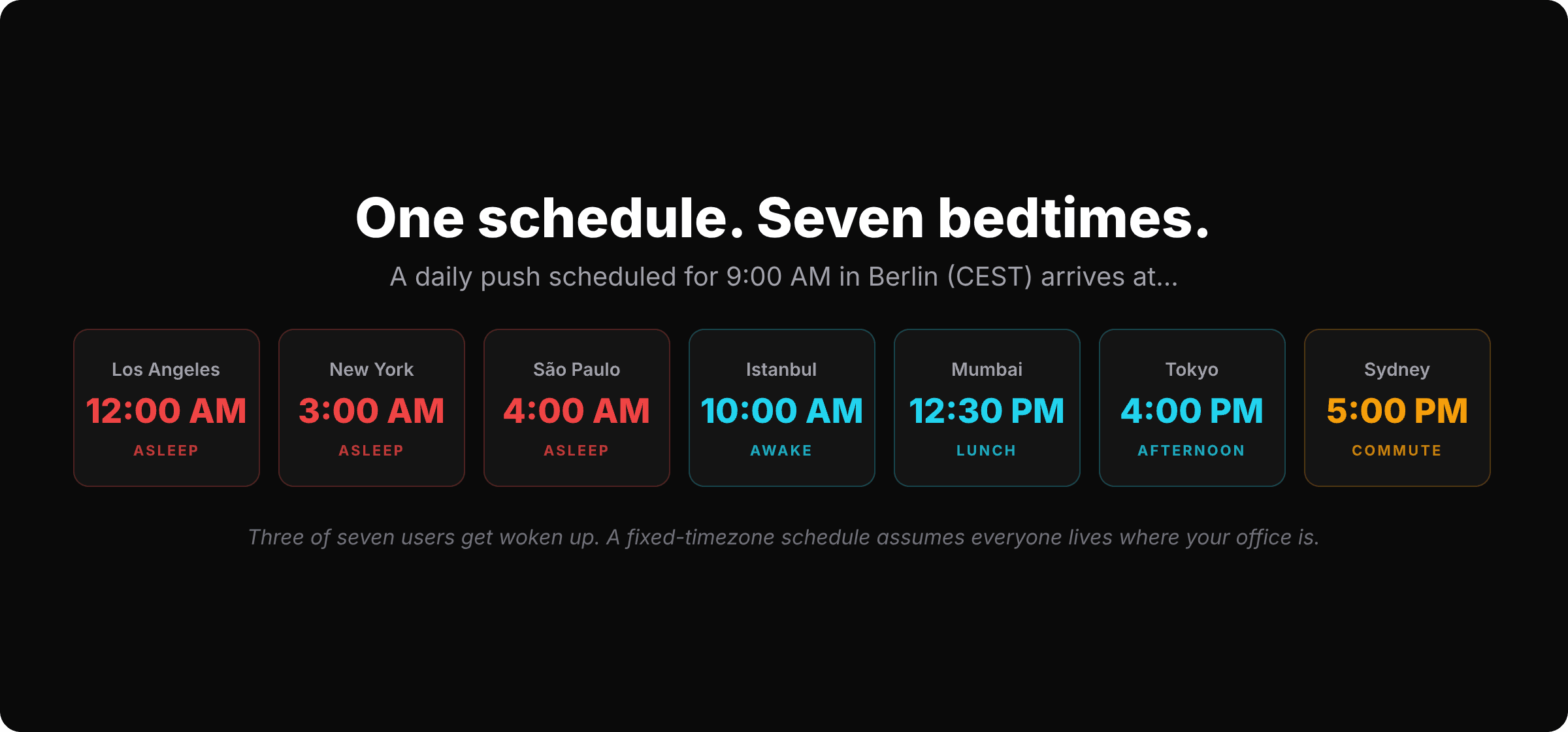
For a team in Berlin with a global audience, that one schedule wakes up New York at 3 AM, Los Angeles at midnight and São Paulo at 4 AM. Tokyo gets the “good morning” in the middle of the afternoon, and Sydney is on the train home. Of the seven cities in that graphic, exactly two are anywhere near the moment you pictured when you typed 09:00.
I want to walk through how we think about timing at SmartAppPush. It has less to do with finding the mythical best hour and more with getting three separate things right: the clock, the trigger, and the frequency.
Timing is two different problems
Most “best time to send push notifications” articles blend two questions that have little to do with each other.
- The clock problem. A scheduled campaign (daily digest, weekly summary, streak reminder) needs a local hour. The question is when on the user's day.
- The trigger problem. An event-driven campaign (abandoned checkout, day-3 inactivity) needs a delay. The question is how long after the behavior.
The trigger problem is mostly solved by the event itself. Someone who abandoned checkout at 14:12 should hear from you at 14:45, not at whatever hour your calendar says. We've covered the delays that work for cart abandonment and for onboarding flows, and the broader split in event-driven vs. scheduled push.
The clock problem is where most apps quietly lose people, so that's where I'll spend most of this post. Then we'll come back to the one thing event-driven pushes still get wrong about time.
Fixed timezone vs. per-user local
A scheduled campaign in SmartAppPush runs in one of two timezone modes. Fixed sends to everyone at the scheduled time in a single zone you choose. Per-user local sends at the scheduled time in each user's own timezone, so the 8:00 digest lands at 8:00 in Tokyo, 8:00 in London and 8:00 in New York. The scheduled campaigns docs cover the setup; the harder question is which mode a given campaign deserves.
The rule I use: if the message is about the user's day, go local. If it's about a shared moment or a shared deadline, go fixed.
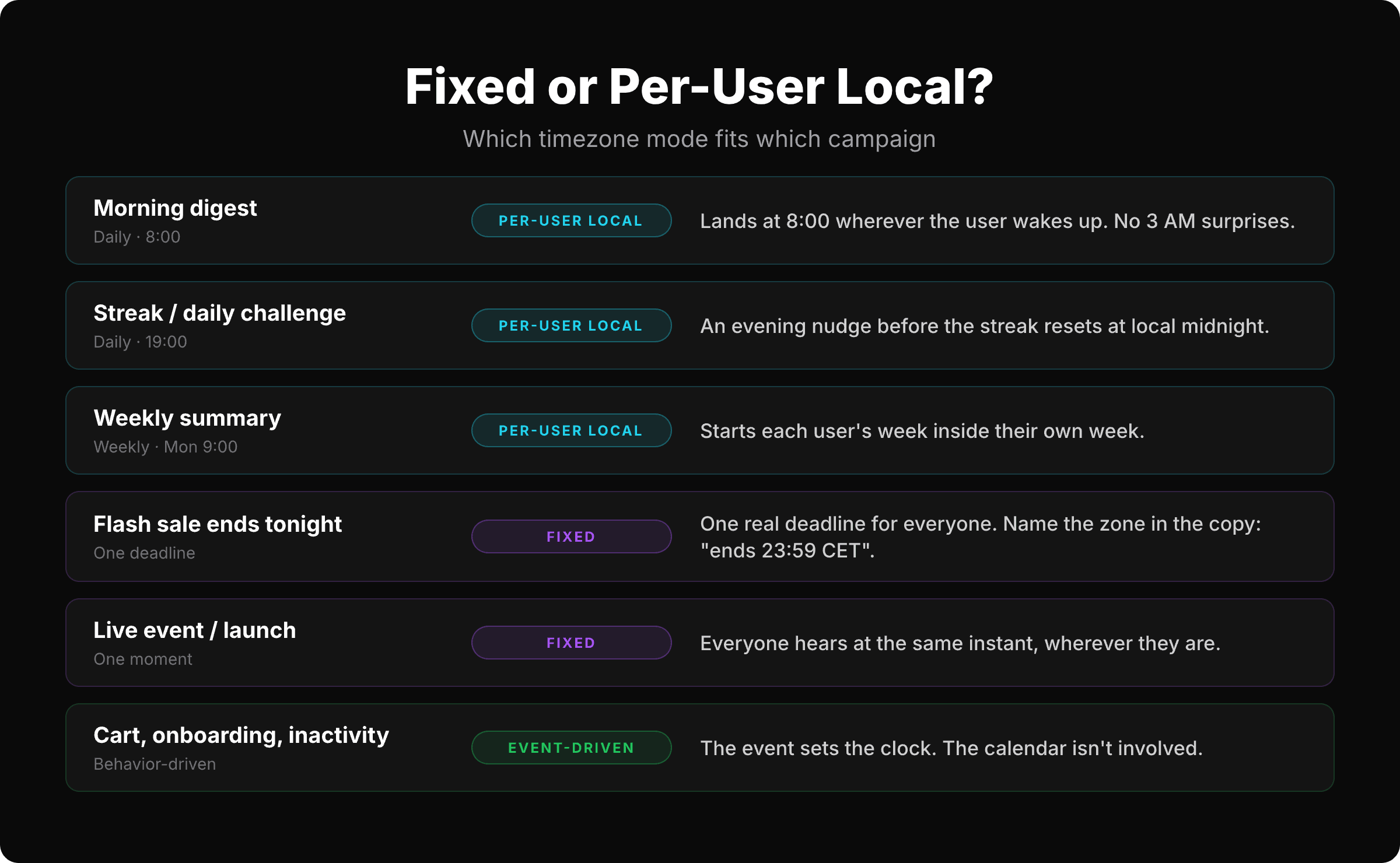
Recurring content is about the user's day. A morning digest is only a morning digest if it arrives in the morning. A streak reminder has to land before the streak resets at the user's midnight, not yours. A weekly summary should open the user's Monday. All three go per-user local, and I can't think of a scenario where fixed serves them better.
Deadlines and launches are shared moments. A flash sale ends at one real instant, and telling a user in Los Angeles that it “ends tonight” when tonight is already over in Berlin is worse than the 3 AM push. Keep those fixed, and put the zone in the copy: “ends 23:59 CET” is honest, while “ends tonight” is a guess the user has to make. If most of your revenue comes from one region, pick that region's zone as the fixed one and accept that the rest of the world hears about it at an odd hour.
Behavior-driven campaigns aren't really on this chart because the calendar isn't involved. The event sets the clock.
Where the timezone actually comes from
Per-user local delivery needs one thing from your app: the user's timezone, sent as an IANA zone name (Europe/Berlin, America/New_York) on every event. SmartAppPush treats it as a required field on the events endpoint, so there's no “unknown timezone” bucket to plan around. The device already knows the zone; you just have to read it:
// Swift (iOS)
TimeZone.current.identifier                          // "Europe/Berlin"

// Kotlin (Android)
java.util.TimeZone.getDefault().id                   // "Europe/Berlin"

// JavaScript (web, React Native with Hermes)
Intl.DateTimeFormat().resolvedOptions().timeZone     // "Europe/Berlin"
Then it travels in the event payload next to the timestamp:
curl -X POST https://api.smartapppush.ai/events \
  -H "Content-Type: application/json" \
  -d '{
    "tenant_id": "your_tenant_id",
    "api_key": "your_app_api_key",
    "app_user_id": "user_123",
    "event_name": "app_opened",
    "event_time": "2026-08-30T08:05:00+02:00",
    "device_token": "fcm_device_token_here",
    "platform": "ios",
    "push_permission_granted": true,
    "timezone": "Europe/Berlin",
    "language": "de",
    "country": "DE",
    "session_id": "sess_abc123"
  }'
Two details matter here. First, event_time carries an offset (+02:00) and timezone carries a zone name, and they aren't interchangeable. An offset is only correct until the next daylight-saving switch; a zone name stays correct through it. Berlin is +02:00 in August and +01:00 in December, and Europe/Berlin covers both without you doing anything.
Second, send the timezone on every event, not just at signup. The user's profile is updated with each event, so someone who flies from Berlin to New York and opens the app at the airport gets tomorrow's 8:00 digest at 8:00 in New York. Send it once at signup and they stay on Berlin time until they reinstall.
The best-time-to-send data, and what to do with it
There's a lot of published data on when people open push notifications, and the studies I've seen mostly agree on the broad shape: engagement rises through the morning, peaks around lunch and again in the early evening, and drops sharply after 22:00 local. Batch's 2025 push benchmark also puts a number on why timing that follows the user beats timing that follows a calendar: contextual campaigns opened at 14.4%, against 4.19% for generic ones.
The problem with acting on the averages is that they blend every app category together. A fitness app peaks at 6:30 in the morning, food delivery at 11:30 and again at 18:00. A puzzle game? 21:30, on the couch. If you schedule your workout reminder for the industry-wide lunchtime peak, you've optimized for someone else's app.
The data that matters is yours, and you already have it. Pull your app_opened events, bucket them by the user's local hour (that's one more reason the timezone field exists), and look at the curve. Then schedule the campaign for the hour beforethe peak. People open the app at the peak on their own; a push that arrives during it competes with their intent. A push an hour earlier catches them when they're about to reach for the phone anyway, and it's still on the lock screen when they do.
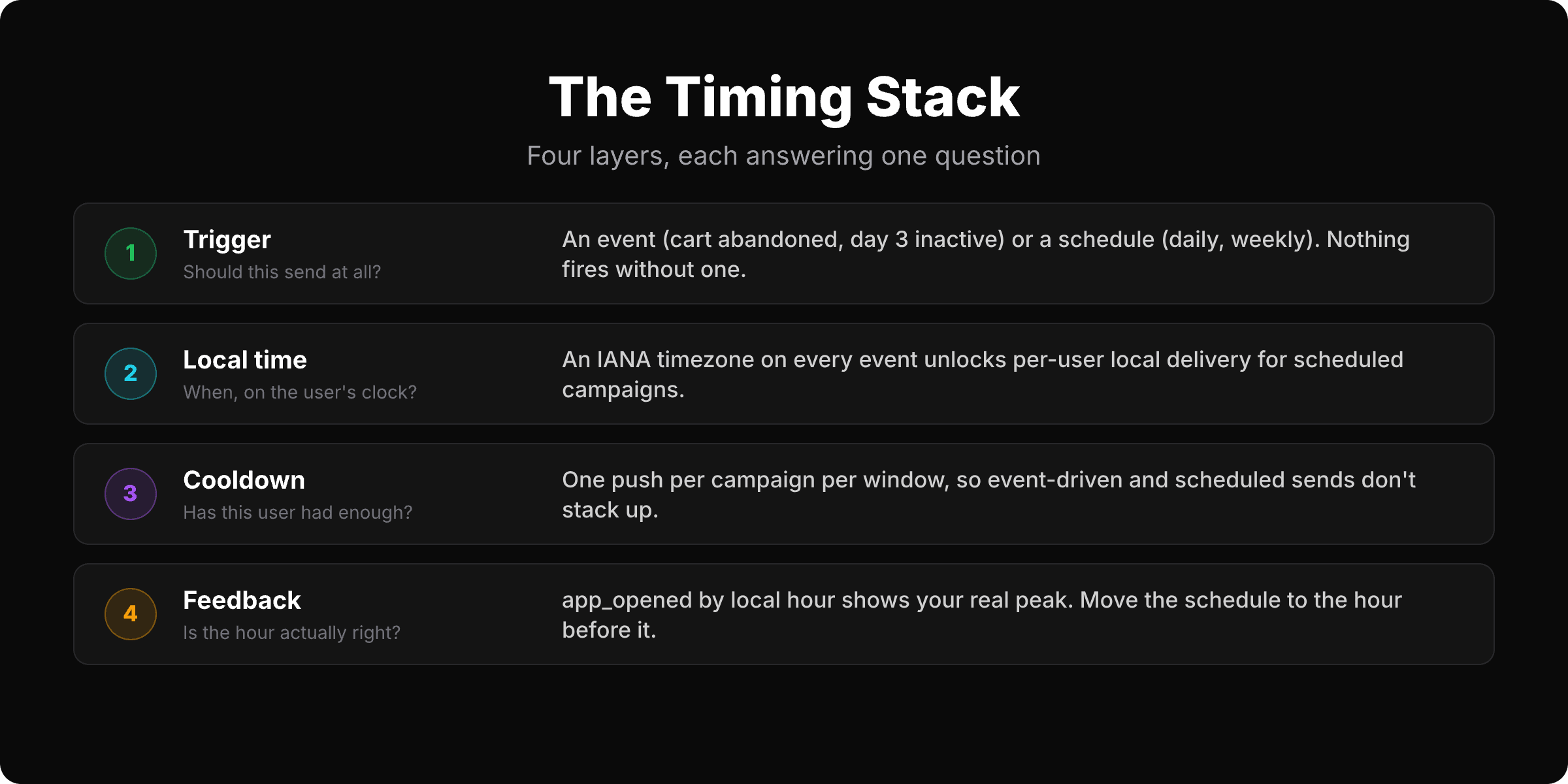
That's the whole stack. The trigger decides whether a message sends, the local time decides when, the cooldown decides whether this user has had enough, and your own open data tells you if the hour is right. Each layer answers one question, and skipping a layer is how a “good morning” lands at 3 AM.
Event-driven pushes have a clock too
I said the trigger problem is mostly solved by the event. The exception is delayed follow-ups.
An immediate trigger is safe by construction. If someone abandons checkout at 1:15 AM, they're awake and holding the phone, and a push twenty minutes later is fine. Inactivity triggers are also safer than they look: “24 hours since last open” fires at the same local hour the user last used the app, which is by definition an hour they tend to be awake. The trigger inherits the user's own rhythm.
The problem is the middle ground. A two-hour delay after a 23:30 session lands at 1:30 AM. A “we miss you” at 72 hours can drift into the night if the user's schedule shifted. Any delayed follow-up that would land between roughly 22:00 and 08:00 local should wait for the morning instead.
The pattern I like for this in SmartAppPush is a morning sweep: a daily scheduled campaign at 9:00 per-user local whose targeting rules include users with checkout_abandoned in the last 12 hours and exclude anyone with purchase_completed in the same window. The night-time abandoners get one useful push with their coffee; everyone else is untouched. The same shape works for any delayed follow-up: let the event qualify the user, and let the local-time schedule deliver the message.
And set a cooldownon every campaign so a user who got the morning sweep doesn't also get the event-driven push and the weekly summary in the same hour. Cooldowns are per campaign, so keep the number of campaigns that can reach the same person on the same day small on purpose.
The order I'd build it in
- Send the IANA timezone on every event. One line per platform, and it unlocks everything below.
- Flip every recurring campaign (digest, streak, weekly summary) to per-user local.
- Keep deadline and launch campaigns fixed, and write the zone into the copy.
- Add a morning sweep for any delayed follow-up that could land at night.
- After two weeks, bucket
app_openedby local hour and move each schedule to the hour before your peak.
Steps one and two take an afternoon, and they deal with the problem in the first graphic head-on; everything after that is tuning you can do while the campaigns run.
Nobody's morning is at 3 AM
A push that arrives at the wrong hour doesn't just go unread. It's the kind of interruption that gets an app muted, and that's one of the main reasons users disable push notificationsin the first place. The fix isn't a smarter time picker. It's remembering that 09:00 is a different moment for every person on your user list, and letting the platform do that math for you.
SmartAppPush scheduled campaigns support fixed and per-user local delivery, with cooldowns on every campaign and SQL-backed targeting rules for the morning-sweep pattern above. There's no SDK to install: the timezone travels in the same API calls you already make.
Try it free at smartapppush.ai or read the scheduled campaigns docs to switch a campaign to per-user local.
Ready to send smarter push notifications?
Build smarter engagement with SmartAppPush.
Get Started Free